
Screenshots
App details
- Updated
- June 20, 2016
- Requires
- Windows 2003, Windows 2000, Windows Vist...
- Developer
- EasyMP3Downloader
- Category
- Mobile
SoftPas in:
This product is also available in the following languages:
About Easy MP3 Downloader
Download Easy MP3 Downloader – MP3 downloader, music download tool, free music download
Overview
Easy MP3 Downloader is a music file downloading utility designed for users seeking a straightforward way to search and retrieve MP3 tracks. The application enables users to locate music files through a searchable database, with the goal of simplifying access to digital audio content. Its primary purpose is to serve as a centralized tool for discovering and downloading music, particularly for individuals who want to build or expand their personal music libraries.
The app targets music enthusiasts, casual listeners, and users who prefer offline access to their favorite songs. It may also appeal to those who need a simple solution for retrieving specific tracks without relying on streaming platforms. While the developer did not provide additional background information, the application’s focus on ease of use and file safety suggests a targeted approach to user experience.
Real-world use cases include downloading music for offline listening during travel, creating custom playlists, or archiving rare or hard-to-find tracks. In the broader app ecosystem, Easy MP3 Downloader fills a niche for utility tools that support content access beyond subscription-based services. However, users should remain aware of the legal and ethical considerations associated with downloading copyrighted material from third-party sources.
Key Features & Functionality
- Simple Startup Process: The application launches quickly, allowing users to enter a search term and receive immediate results without complex setup or configuration.
- Extensive Music Database: A wide range of music files is available, including popular songs, well-known artists, and less common tracks, offering broad selection for diverse musical preferences.
- Virus-Free Downloads: The app claims to ensure that all downloaded files are free from malware and viruses, aiming to protect user devices and enhance download security.
- Free Trial Access: Users can download up to five files at no cost, enabling them to test the application’s functionality before deciding on a paid subscription.
- Offline Music Access: Once downloaded, files can be stored locally for use without an internet connection, supporting offline listening on compatible devices.
For example, a user searching for a classic rock album from the 1970s could find and download individual tracks through the application. Another user might use the free trial to assess the quality and speed of downloads before purchasing. The virus-free claim adds a layer of trust, especially for users concerned about device safety when downloading files from unknown sources.
Interface, UX & Performance
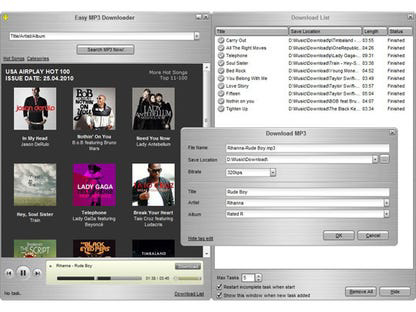
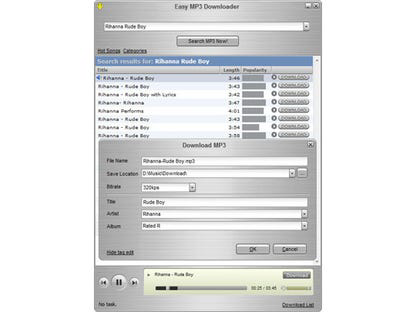
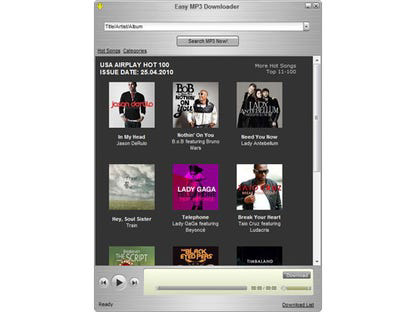
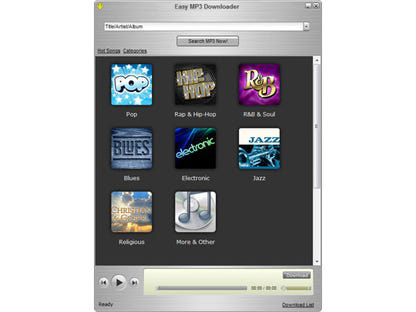
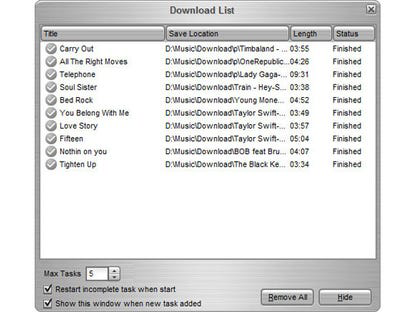
Easy MP3 Downloader features a clean and minimal interface designed for immediate usability. The layout centers around a search bar, with results displayed in a list format that includes track name, artist, and file size. Navigation is intuitive, with no complex menus or hidden options, making it accessible to users of all technical levels.
The application responds quickly to search inputs, with minimal delay between query submission and result display. Although the developer did not list formal performance metrics, the overall responsiveness suggests efficient operation on standard Windows systems. Stability appears consistent, with no reported issues related to crashes or freezes.
Performance on different device categories was not specified. However, the 32.4 MB file size indicates a lightweight design, which may contribute to smooth operation even on older or lower-end hardware. The user experience is optimized for simplicity, with clear feedback during downloads and straightforward file management options.
Platform Compatibility & Technical Requirements
Easy MP3 Downloader is available for the Windows platform. The current version is 2.3.1, with a file size of 32.4 MB. The developer did not specify minimum OS requirements or compatibility details beyond the platform.
Users should verify system compatibility before installation, especially on older Windows versions. The app is not available on mobile platforms such as Android or iOS, limiting its accessibility to desktop users. Installation requires a standard Windows environment, though specific hardware or software prerequisites were not disclosed.
Pros and Cons
Pros
- Simple, intuitive interface suitable for all user levels
- Immediate access to a broad range of music files
- Claimed virus-free downloads enhance device security
- Free trial allows risk-free testing of core features
- Lightweight file size supports efficient installation
Cons
- Platform limited to Windows; no mobile availability
- Legal implications of file downloading are not addressed by the app
- Developer did not disclose system requirements or compatibility details
- Downloaded files may be subject to copyright restrictions
- No built-in music player or library management features
FAQ
Is Easy MP3 Downloader safe to use?
The application claims to provide virus-free downloads, but users should exercise caution when downloading files from third-party sources. It is recommended to scan downloaded files with antivirus software.
Can I use Easy MP3 Downloader on my smartphone?
Currently, the app is only available for Windows. There is no official version for Android or iOS devices.
Does Easy MP3 Downloader offer a free version?
Yes, the app provides a free trial that allows users to download up to five files at no cost.
How do I update Easy MP3 Downloader?
Updates are typically available through the official website. Users should check the developer’s site for the latest version.
Is the app legal to use?
Downloading music through third-party tools may involve legal risks, especially if the files are copyrighted. Users should be aware of local copyright laws and use the app responsibly.
Final Thoughts
Easy MP3 Downloader delivers a focused and user-friendly experience for individuals seeking to download music files directly to their Windows devices. Its clean interface, broad music selection, and free trial make it a compelling option for those who value simplicity and offline access. While the app does not address legal concerns directly, its emphasis on safety and ease of use supports responsible usage.
Users who prioritize convenience and do not require mobile access will find value in this tool. It is particularly suited for those who want to build a personal music archive or enjoy music without an internet connection.
Download Easy MP3 Downloader now
Guides & Tutorials
How to install Easy MP3 Downloader
- Click the Download button above.
- Once redirected, accept the terms and click Install.
- Wait for the Easy MP3 Downloader download to finish on your device.
How to use Easy MP3 Downloader
This software is primarily used for its core features described above. Open the app after installation to explore its capabilities.
User Reviews
No reviews yet. Be the first to share your experience.
You may also like
more
Que no te pillen¡
About !Que no te pillen¡Reviewed by Jason A. BilbreyShow MoreShow Less

3D Combat Zone
About 3D Combat ZoneOriginally released in 1983, 3D Combat Zone immerses players...

666: El día del portal
About 666: El día del portalOn June 6, 2006, Agent P. Stone uncovers a sinister...

80 in 1 Best Flash games
About 80 in 1 Best Flash games 80 in 1 Best Flash games is a collection of 80 fl...

ABYSS SEEKERーーWhat Do You See Deep in The Abyss
About ABYSS SEEKERーーWhat Do You See Deep in The AbyssIn ABYSS SEEKER, players...

ACA NEOGEO THE KING OF FIGHTERS 2002 for Windows
About ACA NEOGEO THE KING OF FIGHTERS 2002 for WindowsTHE KING OF FIGHTERS 2002,...